Strategy has a home
Background and business need
Business context
- Every plan Grove writes is checked against the workspace’s strategy: four documents that say what the product is betting on.
- Most of that work leans on the strategy, yet it’s the least looked-after thing in a workspace.
Plans
Checks
Reviews
Four documents
Target Personas
Product Vision
Product Strategy
Competitive Landscape
Owner
Nobody named
Opportunity
- When the strategy is current and owned, Grove’s plans, checks and reviews stand on something the team believes.
- When it’s stale or blank, every plan inherits the gap without anyone noticing.
Urgency
- Setting up the strategy is the first step on every new workspace’s checklist.
- Outside agents can write project documents but can’t read or question the strategy.
- The rules drafted so far handed strategy to workspace admins, who handle billing and invites, not the product’s direction.
Goals
- Make onboarding easier. A new team gets its strategy into Grove without typing it out. We’ll know it’s working when 8 in 10 new workspaces finish strategy setup in their first session.
- Make someone accountable for product and strategy feedback. Every point about the product or its strategy has one named person who settles it. We’ll know it’s working when 9 in 10 strategy threads are settled by the lead within a week of being raised.
Target user problems
Primary user: Founder or Head of Product
The person accountable for the product’s direction, and so the natural owner of its strategy.
- Nobody visibly owns the strategy. No one is named as responsible for the four documents, so questions about them have nobody to wait on.
- There’s no way to tell where the strategy stands. Strategy opens straight into a document, so a lead can’t see which of the four are written, when each last changed, or what’s waiting.
- Setting it up starts from a blank form. Setup asks the lead about their own company before Grove has looked anything up, so they type out what’s already on their website.
- Points about the strategy have nowhere to go. A teammate who disagrees with a line has no place to raise it beside the document, so it goes to Slack or nowhere.
Secondary users
- Product Lead, Developer and Designer: They build against the strategy and have no way to question it in place.
- AI Coding Agent and AI Business Agent: They build against the strategy but can’t read it, question it or revise it through the channel they use for projects.
- Workspace admin: They manage billing, seats and invites, and shouldn’t be the ones strategy questions wait on.
Solution summary
Give the strategy what every other piece of work in Grove already has: a lead, a home page that shows where it stands, and a place for its conversations.
Strategy lead
One person
The team
Any workspace member
Outside agents
Coding and business agents
Grove
Researches the company first
Strategy
Target Personas
Product Vision
Product Strategy
Competitive Landscape
Every plan
Features and projects
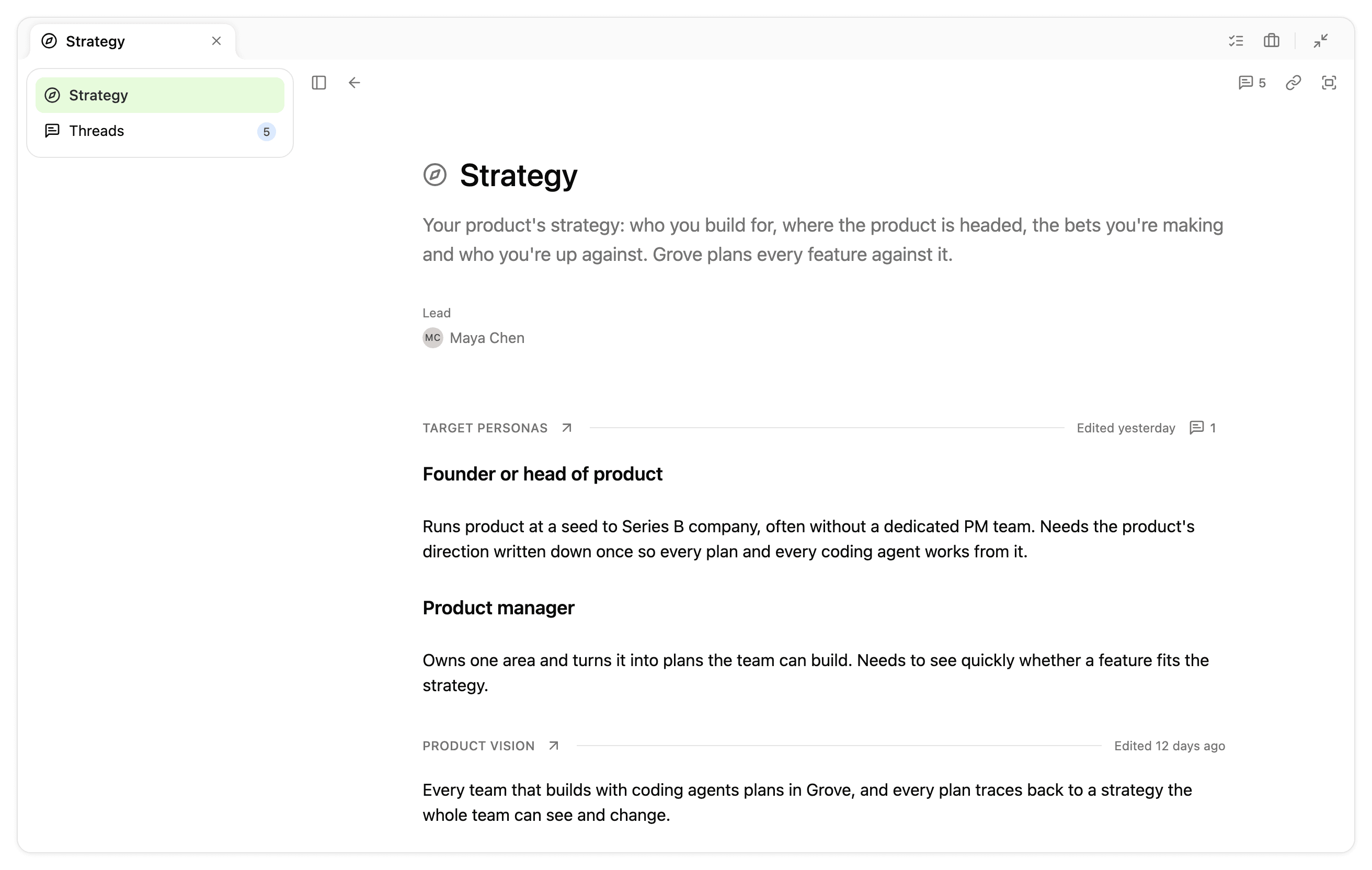
Strategy has a lead and an overview. One person leads the strategy, starting with whoever created the workspace. Strategy opens on an overview of that lead and the four documents. That answers nobody visibly owns the strategy and there’s no way to tell where the strategy stands.
Setup starts from what Grove can find. Grove researches the company before asking anything, then asks only for what public sources can’t hold. That answers setting it up starts from a blank form.
The strategy can be questioned and revised in place, by people and their agents. Threads sit on the product, a document or a passage, and the ones waiting on the lead reach their Queue. Outside agents read, question and update the strategy through the channel they already use for projects. That answers points about the strategy have nowhere to go.
Projects, in order
- Researched strategy setup for new workspaces
P-366
A founder or head of product sees what Grove found about their company and supplies only what it couldn’t find. - Strategy overview for teams
P-479
A founder or head of product reads and edits all four documents on one page, or is invited to set them up. - Strategy lead for teams
P-541
A founder or head of product leads the strategy from the moment the workspace exists, and the team can see who that is. - Strategy reading & editing for agents
P-483
A coding or business agent reads and revises the strategy through the channel it already uses for projects. - Strategy threads & agent updates
P-323
Anyone raises a thread on the strategy, and the lead settles it from their Queue. - Workspace renaming for admins
P-501
A workspace admin renames the workspace, and every old link still works.
Out of scope
- Multiple strategy leads or a strategist role. More than one person, or a group, owns the strategy.
- Strategy access controls. Some members can’t see a document, or can only view it.
- Changing the set of strategy documents. A workspace adds, removes or renames documents beyond the four.
- Strategy change alerts on projects. Projects are flagged when a strategy document changes.
- Strategy approvals. A change waits for sign-off before it takes effect.
- Several products in one workspace. One workspace holds the strategies of several products.